
Exploring BC Bee Atlas Data Using ecdysis

Updated: Dec 21, 2025
Author: Bob McDougall
The BC Bee Atlas is the flagship project of the Native Bee Society of BC. It empowers British Columbian community scientists to produce biodiversity data and make amazing discoveries about the province’s wild bees and diverse flora. Online education and data management are supported by the Oregon State University Extension Service Master Melittologist Program.

With almost 5000 native bee records, the BC Bee Atlas is creating high value biodiversity data. This post will demonstrate accessing and searching the data set, by taxonomic groups, geographic areas, collection information, dates, and host plants.
Quick Links:
Native Bee Society of BC Bee Atlas (NBSBC-BCBA) Collection Ecdysis Profile: https://ecdysis.org/collections/misc/collprofiles.php?collid=196
We'll first look at how to find the Collection on ecdysis.
Once at the NBSBC-BCBA Collection profile page, the Geographic Distribution, the Family Distribution, and the Advanced Search of the Collection will be explored.
When exploring Geographic Distribution, we'll look at finding information in the Collection in a particular geographic area, including Occurrence Records, Species List, and the Maps of volunteer's collections in that area.
When exploring Family Distribution, we'll look at finding information about a particular Bee Family, including Occurrence Records, Species List, and the Maps of volunteer's collections of that Family.
When exploring the Advanced Search of the Collection, we'll look at additional ways to explore the data, including by Bee Taxon, Location, Elevation, Collection Event, Collector, Association, and the related Occurrence Records, Species List, and Maps.
Finding the NBSBC-BCBA Collection profile page on ecdysis
Skip to Next Section
Recommended Bookmark! Direct link to the Native Bee Society of BC Bee Atlas (NBSBC-BCBA)profile page: https://ecdysis.org/collections/misc/collprofiles.php?collid=196
Ecdysis can be found online at https://ecdysis.org
Once on the Ecdysis web page the NBSBC-BCBA Collection profile page can be found by going to the Sitemap link as indicated by the red arrow in the image below. Worth bookmarking is the following URL directly to the profile page https://ecdysis.org/collections/misc/collprofiles.php?collid=196 This said it would be worthwhile knowing how to navigate via the site map in case the bookmarked URL is not directly at hand.

Once at the Site Map page, select the Collections link as indicated by the red arrow in the image below.

Scroll down the Collections page until you find Native Bee Society of BC Bee Atlas Collection or use your browser Command F or Ctrl F key to find Native Bee Society of BC Bee Atlas.

Look over where the Collections are written instead of for the Icon because some of the preceding icon acronyms are not in alphabetical order. Once here, select the Collection. Picking Homepage will take one back to the NBSBC web page. More Information within that grouping will also take one to the Collection profile page.

Below is the NBSBC-BCBA Collection profile page. The URL for this page is https://ecdysis.org/collections/misc/collprofiles.php?collid=196 One could save time and just copy this into bookmarks.

Exploring Geographic Distribution
This feature can be used to view occurrence records, species lists and distribution maps for each regional district where specimens were collected.
In the bottom 1/3 of the NBSBC-BCBA Collection profile page click the link for Geographic Distribution as indicated by the red arrow in the image below.

The first Geographic Distribution shows Canada as indicated in the image below. Click the link indicated by the red arrow in the image below.

The second Geographic Distribution shows British Columbia as indicated in the image below, with the total BC records. To further explore BC data click the link on the web page indicated by the red arrow in the image below.

BC regions are now listed, with the number of specimens in each region. Select the link to Regional District of Central Okanagan as indicated by the red arrow in the image below.

A new tab will open, as seen below. We can see that there is a list of the five Occurrence Records from the Regional District of Central Okanagan, with a summary of details for each record.
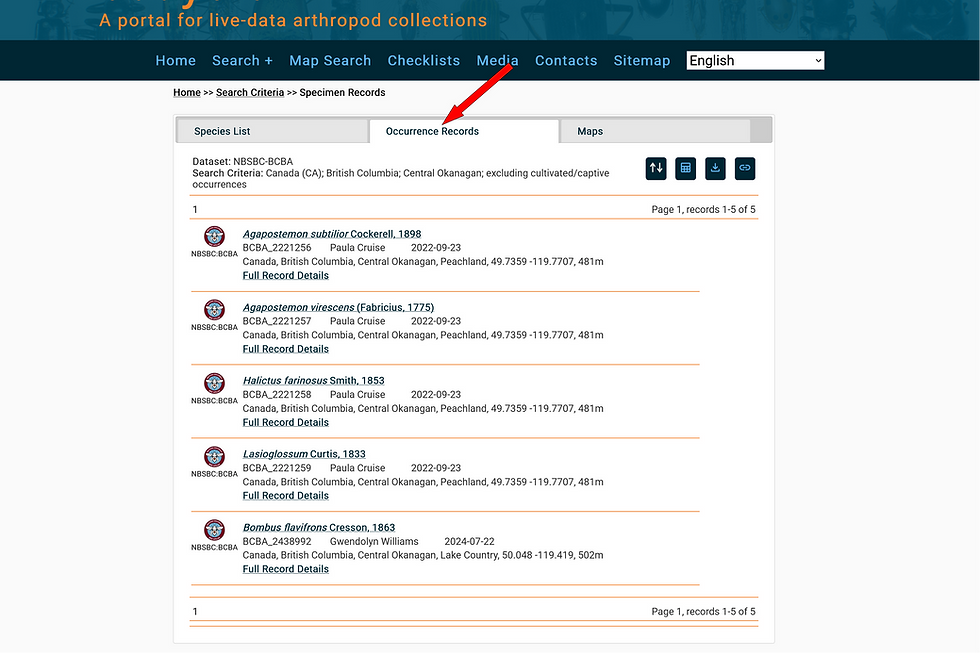
Clicking “Full Record Details” in the example above will link the complete data for each specimen. We will explore this further within this section.
If the tab for Species List is engaged, one will see a downloadable species list for the current search query, organized by bee family.

To explore the data in a map engage the Maps lettering in the tab as indicated by the red arrow #1 in the image below. Linking through to Display coordinates in the Map as indicated by the red arrow #2 will take us to the map of collection sites in a new browser window.

Within the map below one can see two coloured points on the map. One near the top right. The other near the bottom left.

If one hovers the cursor/mouse near the bottom point a name will appear. This is a species record contributed by that collector on the date indicated.

For the bottom record, when clicked, the one point spreads into four, showing that more than one specimen was collected in the same location. This is often the case during collection events. Each species on the map is represented by a different colour.
Looking back at the Occurrence Records, all five records from that page are now visible on the map. At the top left of the map is a link to Open Search Panel.

On opening the link a three tabbed panel opens. The first panel, in darker grey, has Records as seen below.

The second tab shows the collections with data displayed on the map. Since we started on the NBSBC-BCBA profile page, only records from the BC Bee Atlas collection are displayed. Searching from the Ecdysis home page may show records from additional collections managed on Ecdysis.

The third tab has the Taxa List from the map. Clicking on the coloured boxes will allow adjustment of the colour of that species point. Use this to make particular species of interest stand out in the map, especially when there are many species and points.

Hovering the cursor over the upper right point reveals another Collector and date.

When a point associated with only one record is clicked the full record details for that specimen opens. Clicking the link indicated by the red arrow will open the iNaturalist observation associated with this occurrence record.

The iNaturalist record is opened in the original browser window as a new tab. This is the plant the bee specimen was collected from! In the image below, the fields indicated by the red arrow were used to help generate the Collection Labels that were produced at OSU for the pinned bees.

To view details from another regional district, navigate back to your original tab.
Exploring Family Distribution
This feature can be used to view occurrence records, species lists and distribution maps for each bee family and genus that has been collected.
In the bottom 1/3 of the NBSBC-BCBA Collection profile page use the link on the web page for Family Distribution as indicated by the red arrow in the image below.

Clicking that link opens a box that shows the six Bee Families that are present in BC. Clicking on the link with the number of Colletidae specimens will open a tab to all of the Specimen Records of the family within the NBSBC-BCBA Collection, while clicking the Colletidae Family name will show that Family's genera of collected specimens within the NBSBC-BCBA Collection.
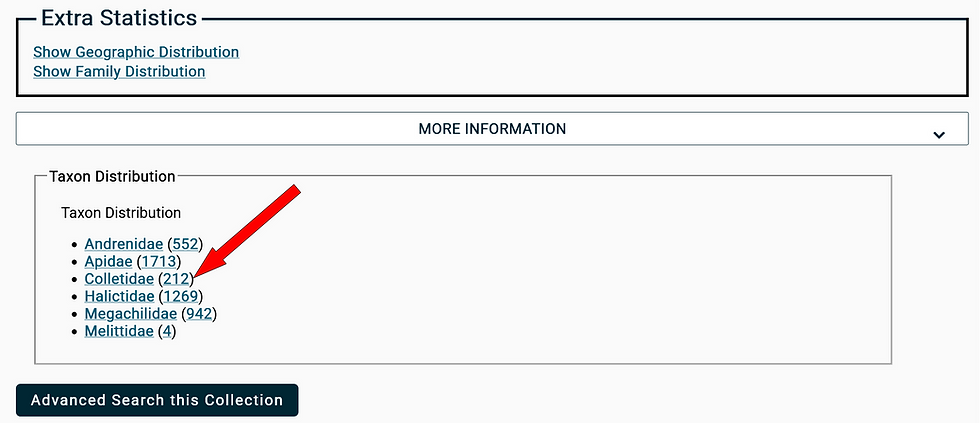
The tab to all of the Specimen Records of that family within NBSBC-BCBA Collection shows that there are three pages of Occurrence Records to a total of 212 records. Clicking “Full Record Details” in the example below will link the data for each specimen. We explored this further near the end of the previous Exploring Geographic Distribution section.

Opening the Species List tab shows the 11 species collected at the time of these records.

The Maps tab (#1) will give access to Display coordinates in Map (#2)

Opening that Display link will result in a new browser window showing the map of coordinates of where records of Colletidae occurred in the data set. The Open Search Panel link will show the list of records for the chosen genera or family.

The Taxa List tab within the Search Panel shows the species and the colour of their points on the map. Going further and clicking on a point that appears clustered reveals more records at that coordinate. In this case many records by multiple collectors and on multiple dates due to a Master Melittologist training event at the site.

Exploring the Advanced Search of the Collection
This feature can be used to search the collection using many different criteria, including taxonomy, location, elevation, collection data, collector and plant host association. For each search type one can view occurrence records, species lists and distribution maps specific to the search query.
In the bottom 1/3 of the NBSBC-BCBA Collection profile page use the link for Advanced Search of the Collection as indicated by the red arrow in the image below.

Taxonomy Search
Taxon
The Taxonomy search function will show the species records and distribution for a particular taxon (species, genus or family).
We are going to search for a Taxon as indicated by the red arrow in the image below. As you can see in the image there are lots of searchable elements from the occurrence records. These can be expanded or condensed, and some we will not explore here but feel free to explore at will.

When initiating a search within a field a drop down menu will appear that gives suggestions for the correct spelling of the possibilities that are being searched. In this case we are looking for Bombus vancouverensis. Typing "Bombus v" in the search field (1#) gave the result (#2) that we were after so that was selected by clicking on it. Capitalization is not required.

Once the correct species is in the desired field we'll select the Search link as indicated by the red arrow in the image below.

The search result opens the Occurrence Records tab accessing three pages of 247 records. Clicking “Full Record Details” in the example below will link the data for each specimen. We explored this further near the end of the previous Exploring Geographic Distribution section.

The species list shows that only Bombus vancouverensis is within this search of records.

The Maps tab (#1) will give access to Display coordinates in Map (#2)

In the Map of Coordinates we can see the extent of Bombus vancouverensis collection events recorded by the NBSBC-BCBA. We are going to explore the northernmost collection point as indicated by the red arrow in the image below.

Hovering the mouse shows the name of the collector at this point.

Clicking on the point reveals many occurrence records at that point as seen by the cluster of points below.

As seen below, each one of those points will have a Collector Name and Date associated with it.

Clicking on the point will open the Occurrence Record of that Event.

Locality Search
The locality search displays the occurrence records, species list and distribution map based for a specific location.
Starting at the Advanced Search page we are going to make a search of Occurrence Records within a desired Locality.

County
For the BC Bee Atlas data, regional districts can be searched using the County field. In this instance we are going to look up Collecting Events within the "County" of Cariboo Regional District as indicated by the red arrow #1 in the image below. Next we will select the Search button as indicated by the red arrow #2.

The page opens at the Occurrence Records tab showing 2 tab pages listing 169 records. Clicking “Full Record Details” in the example below will link the data for each specimen. We explored this further near the end of the previous Exploring Geographic Distribution section.

The species list from this page shows 37 species (some represented only by Genus)

Following through the Maps tab prompts we can see the coordinate points of occurrence records which can be explored further.

Elevation
Also under the Locality search we can look up Occurrence Records that occur at certain elevations, such as bees occurring near sea level, or at high elevations. This is selected as indicated by the red arrow.

We are going to look for Collection Events that occurred above 1200 metres and select the Search button.

The Occurrence Records tab shows 2 tab pages listing 162 records. Clicking “Full Record Details” in the example below will link the data for each specimen. We explored this further near the end of the previous Exploring Geographic Distribution section.

The species list from this page shows 61 species (some represented only by Genus)

Following through the Maps tab prompts we can see the coordinate points of occurrence records which can be explored further.

Collecting Event Search
Using the Research Search page we are going to make a search of Occurrence Records within desired Collecting Event parameters. This search could be used to understand what bees are active at various times of year, or to find all the records submitted by a specific volunteer. The section of Record Search is found below the Taxonomy, Locality, and Latitude & Longitude sections of the Records Search page. We'll start here by collapsing those sections as noted in the image below.
The first things we will search for here are Collecting Events defined by certain dates. The red arrows below indicate where the date ranges are found.

Collection Dates
The desired dates are put in the search fields and the Search button is clicked.

The Occurrence Records tab shows 3 tab pages listing 211 records. Clicking “Full Record Details” in the example below will link the data for each specimen. We explored this further near the end of the previous Exploring Geographic Distribution section.

The species list from this page shows 49 species (some represented only by Genus)

Following through the Maps tab prompts we can see the coordinate points of collection events which can be explored further. In this example, all of the Collecting Events in BC on those dates occurred in a very small area.

These observation events are bound in a very close area between 49.517, -120.128 and 49.152, -119.594. This happens to be the same days as the Master Melittologist Field Training and Collecting Event near Oliver BC. We won't go into it in this tutorial but the Latitude & Longitude section of the Record Search page searches a defined area such as the example below.

Collector
Under Collecting Event search we can search for specific Collectors. The Field for this is noted below by the red arrow.

Fill in the Collector and click the Search button

The results of the Collector search open the Occurrence Records for this particular Collector. Here we see that there are 101 records. Clicking “Full Record Details” in the example below will link the data for each specimen. We explored this further near the end of the previous Exploring Geographic Distribution section.

The Specimen Records page species list from this page shows 38 species (some represented only by Genus)
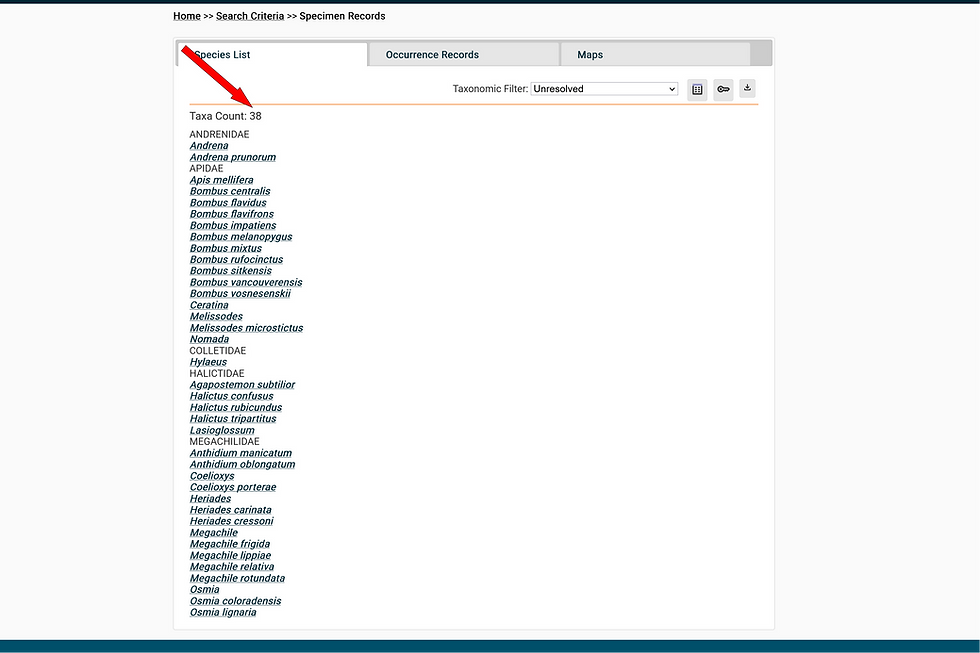
Following through the Maps tab prompts we can see the coordinate points of collecting
events which can be explored further. The map layers below were changed from Terrain to Basic in the upper right so that the points would be more visible.

Associations Search
An Associations search pulls up all the bee records associated with a specific plant host. This can be used to better understand the important pollinators of plants of interest.
Using the Research Search page we are going to make a search of Occurrence Records within desired Associations parameters. This section of Record Search is found below the Taxonomy, Locality, Latitude & Longitude, Collecting Event, and Specimen/Observation Properties sections of the Records Search page. We'll start here by collapsing those sections as noted in the image below.
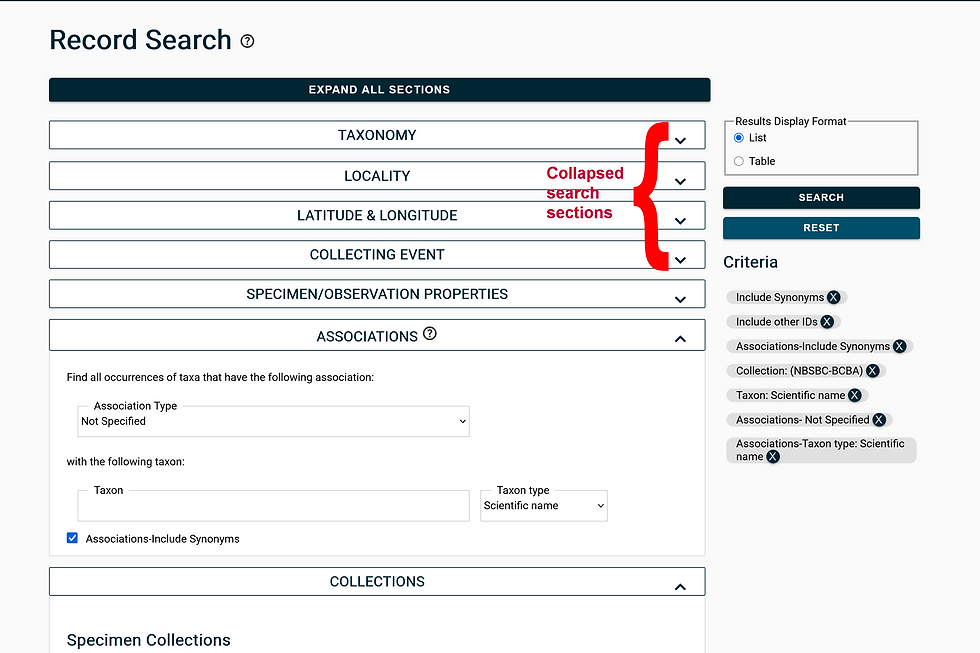
Association Type and Taxon
The "hasHost" parameter is selected from the drop down menu for Association Type. By default it says Not Specified.

Once the correct species is in the desired field we'll select the Search link as indicated by the red arrow in the image below.

The search result opens the Occurrence Records tab accessing three pages of 83 records. Full Record Details link will show the selected occurrence record which includes a further link to the iNaturalist observation for the plant association.

Clicking the link indicated by the red arrow will open the iNaturalist observation associated with this collection event.
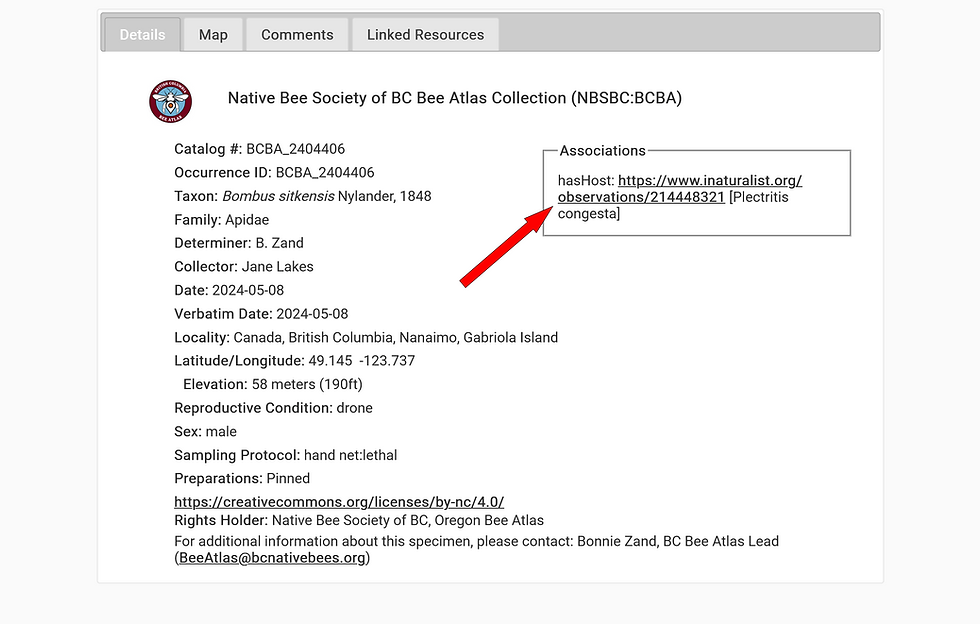
The iNaturalist record is opened in the original browser window as a new tab. This is the plant the bee specimen was collected from! In the image below, the fields indicated by the red arrows were used to help generate the Collection Labels that were produced at OSU for the pinned bees.

Please note that the map and taxa list don't currently work with the existing platform. An update in 2026 is expected to change this function.
Criteria
When doing a search make sure that previous criteria from earlier searches does not influence your subsequent searches. Clicking the Ⓧ will remove the unwanted Criteria.

Quick Links:
Native Bee Society of BC Bee Atlas (NBSBC-BCBA) Collection Ecdysis Profile: https://ecdysis.org/collections/misc/collprofiles.php?collid=196
Biography:
Bob McDougall, from Victoria, BC, started the OSU Master Melittology Apprentice Program in Feb 2023 and received Journey Level Certification in Feb 2025. He is currently giving the gift of his time and knowledge at the Royal BC Museum identifying Bombus. His life learning of nature includes marine organisms, birds, pollinators, and general fauna.


It's fascinating to see how the BC Bee Atlas is leveraging community science to gather such a wealth of data on native bees. For anyone interested in learning more about the biodiversity data and how to access it, Scritchy Scratchy has some useful guides on navigating datasets like these.
The Selena Gomez Floral Dress has such a graceful and feminine feel. The floral pattern gives the look plenty of character while keeping it elegant and wearable. It would be easy to imagine styling a piece like this for a birthday celebration, dinner, garden event, or a relaxed summer occasion.
This guide explains router login in a logical and easy-to-read format. The information about 10.0.0.0.1 helped me understand a common mistake and pointed me toward the correct approach.
I was looking for a quick browser game and found Drive Mad. It loads quickly and works well for short gaming breaks.
Snow Rider 3D is an immensely popular endless sledding game that players can enjoy directly from their browser.